Elementor Pro – Advanced Page Builder WordPress Plugin
 GPL Licensed
Daily Updates
Unlimited Sites
GPL Licensed
Daily Updates
Unlimited Sites

Elementor Pro is an advanced WordPress page builder plugin designed for users who want full visual control over their website without relying on custom code. Built on top of the free Elementor core, it extends the editor with professional design tools, dynamic content capabilities, and deep integration with WordPress and WooCommerce.
This plugin is commonly used for building business websites, landing pages, online stores, portfolios, and content-driven platforms where layout flexibility and performance matter. Elementor Pro allows site owners, designers, and developers to create fully customized page structures while maintaining compatibility with modern WordPress standards.
The version provided here is a GPL-licensed distribution, suitable for use in WordPress projects where flexibility, transparency, and self-managed updates are required.
✅ Key Features
-
Visual drag-and-drop editor with real-time front-end preview
-
Theme Builder for customizing headers, footers, single posts, and archive layouts
-
Advanced widgets including forms, sliders, galleries, and call-to-action blocks
-
Dynamic content support using custom fields and WordPress data sources
-
WooCommerce builder for product pages, shop layouts, and checkout customization
-
Popup Builder for creating marketing popups, modals, and notifications
-
Motion effects and interactions for enhanced user experience
-
Responsive controls for desktop, tablet, and mobile layouts
-
Role manager for controlling editor access across user roles
-
Compatibility with most modern WordPress themes and plugins
How Elementor Pro Works
Elementor Pro replaces the traditional WordPress editing workflow with a visual interface that allows users to design pages directly on the front end. Elements are added by dragging widgets onto the canvas, where spacing, typography, colors, and layout settings can be adjusted instantly.
The Theme Builder feature makes it possible to design global templates such as headers, footers, blog posts, and category pages without editing theme files. For dynamic websites, Elementor Pro connects with custom fields and post data, enabling reusable layouts that automatically adapt to different content.
Use Cases
Elementor Pro is suitable for a wide range of WordPress projects, including:
-
Business and corporate websites requiring custom branding
-
WooCommerce stores needing tailored product and shop layouts
-
Landing pages optimized for conversions and marketing campaigns
-
Portfolio and personal brand websites
-
Content-heavy blogs using dynamic templates
It is especially useful for users who want design freedom while keeping development workflows efficient.
WooCommerce Integration
With built-in WooCommerce widgets, Elementor Pro allows full customization of product pages, shop grids, and checkout layouts. Store owners can visually design sales-focused product pages without relying on pre-defined theme templates, making it easier to optimize layout, trust elements, and calls to action.
Installation & Usage Guide
Follow the steps below to install and activate Elementor Pro correctly in a WordPress environment.
Step 1
Obtain the Elementor Pro GPL package from the provided source.
Step 2
Extract or unzip the downloaded package using software such as WinRAR or 7-Zip.
Step 3
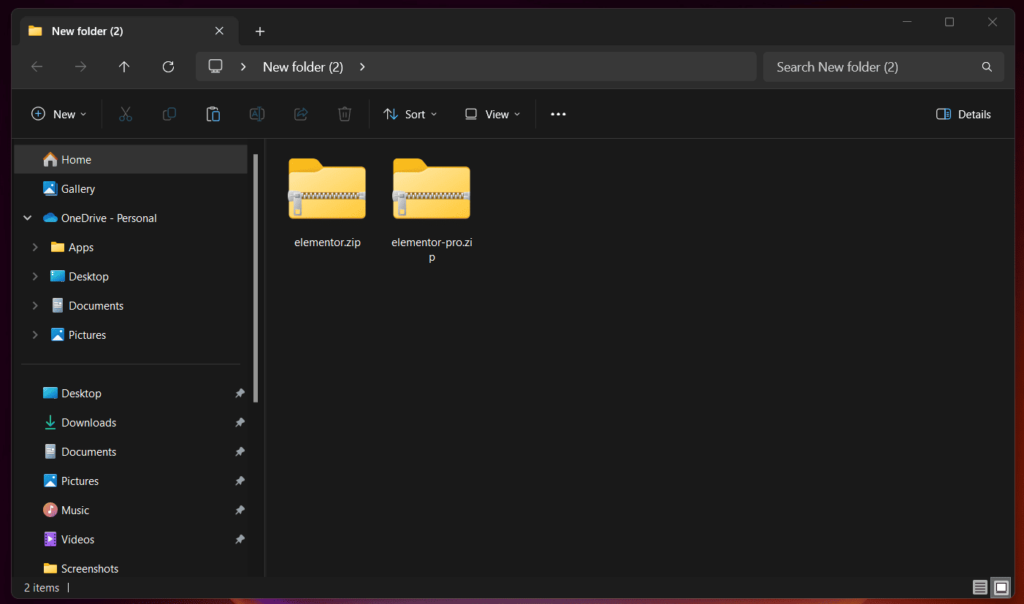
After extraction, you will find two plugin files:
-
Elementor (free core plugin)
-
Elementor Pro (extended functionality plugin)
Step 4
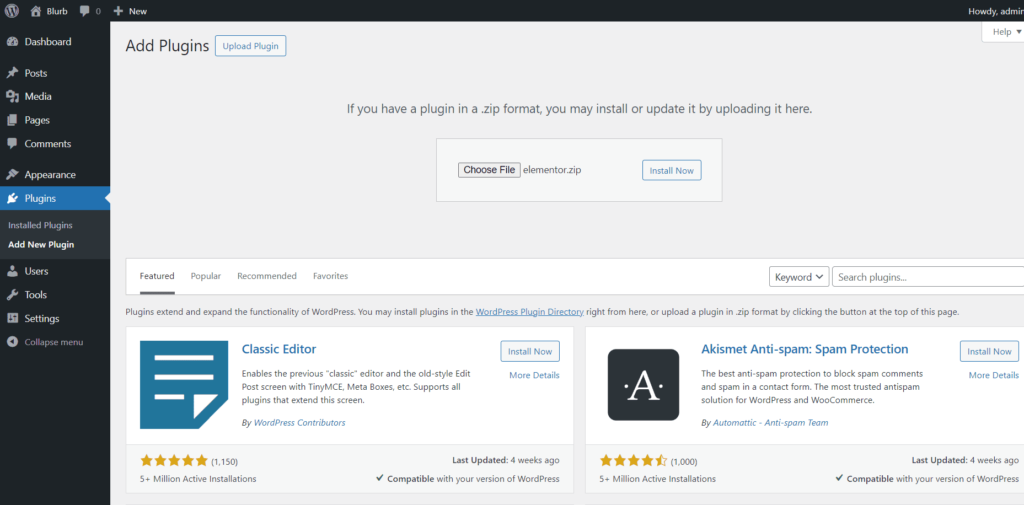
Go to WordPress Dashboard → Plugins → Add New → Upload Plugin.
Choose the Elementor (free) plugin file, then click Install Now.
Step 5
Once the installation is complete, click Activate to enable the Elementor free plugin.
Step 6
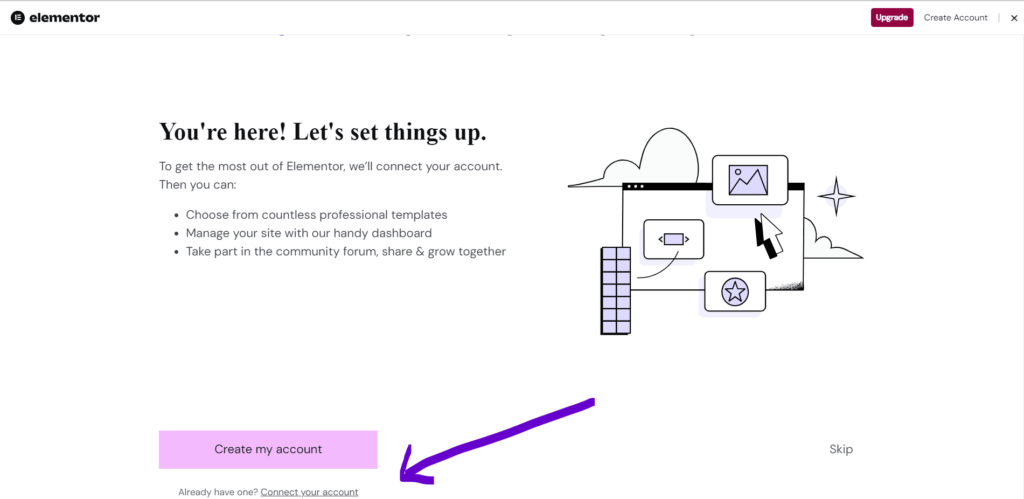
After activation, Elementor will prompt you to access the Elementor dashboard.
Step 7 (Optional)
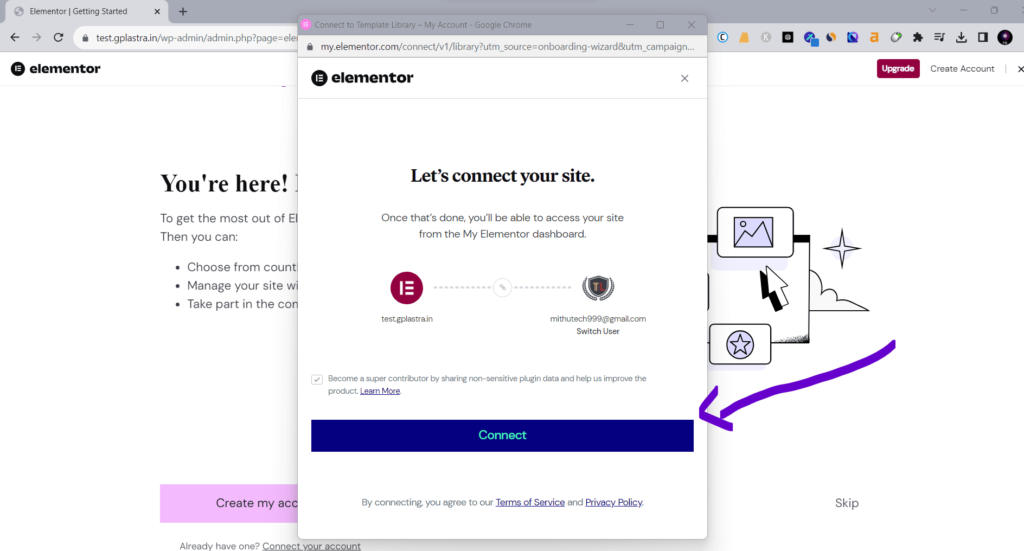
If you already have an Elementor account, you can sign in.
If not, you may create a new Elementor account. Registration is optional and used only for basic services.
Step 8
After signing in or skipping the process, your website will be connected to Elementor.
Step 9
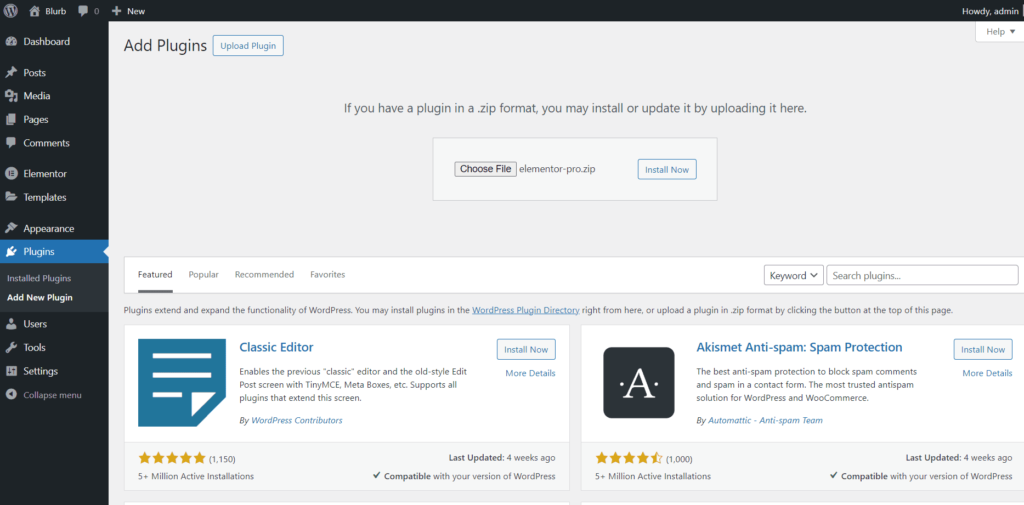
Return to Plugins → Add New → Upload Plugin.
Select the Elementor Pro plugin file and click Install Now.
Step 10
Once Elementor Pro is installed successfully, click Activate.
Step 11
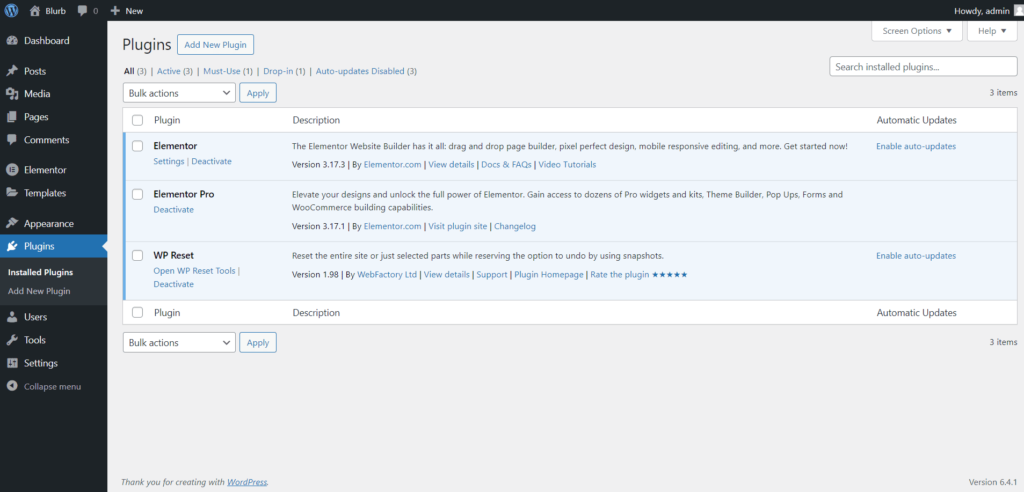
After activation, all Elementor Pro features and templates become available inside the Elementor editor.
Step 12
You can now insert and customize Elementor Pro templates and advanced widgets when building pages.
Notes
-
Elementor Pro requires the free Elementor plugin to be installed and activated first.
-
Ensure your WordPress version and theme are compatible with Elementor for best performance
Performance & Compatibility
Elementor Pro is built to work with modern WordPress environments and supports clean output when used with optimized themes and caching solutions. Performance depends largely on design complexity and hosting configuration, but the plugin remains compatible with common optimization tools and CDNs.
FAQ
Is Elementor Pro GPL-licensed?
Yes. Elementor Pro is released under the GPL license, which allows redistribution and use within WordPress projects.
Can Elementor Pro be used on multiple websites?
GPL licensing permits usage on multiple sites. Implementation depends on individual project requirements.
Does this version include all Pro features?
This distribution includes the full feature set available in Elementor Pro.
Is it compatible with the latest WordPress version?
Elementor Pro is regularly updated to maintain compatibility with current WordPress releases.
Final Notes
Elementor Pro is a powerful solution for users who want to build professional WordPress websites with full visual control. Its flexibility, ecosystem support, and integration capabilities make it a popular choice among designers and developers working on scalable WordPress projects.
-
 Unlimited Website Usage
-
100% Original Files
-
No License Key Required
-
100% Virus/Malware Free
-
Legal GPL License
-
Lifetime Free Updates







Reviews
There are no reviews yet.